

Krea sets up postpaid billing on a billing account under a contract. Contact
sales to arrange one. An Enterprise plan alone does not
turn on postpaid billing.
What Is Invoiced?
Each month’s API and open source usage go on a single usage invoice. Invoices belong to a billing account. Workspaces assigned to the same account share it, and an organization with several billing accounts gets a separate invoice for each.
Your contract can also include:
- Discounts. Lower rates on API usage, open source usage, or specific models.
- Commit minimum. A monthly amount you pay even when usage is lower.
- Rollover. The unused part of a month’s minimum carries over. In later months it pays for usage above the minimum, until the contract ends.
- Prepaid balance. Money you pay in advance. It covers usage before Krea invoices anything.
View Usage and Invoices in Krea
Organization Owners and Admins can review invoiced usage.1
Open Billing
Open Manage ↗ and choose Billing under
your organization.
2
Review Invoiced Usage
Find the Invoiced Usage card. It covers all of your organization’s
billing accounts. When there are several, each section and row names its
account.
3
Inspect a billing account
Select an account in Billing Accounts to see only that account’s credits
and invoiced usage.
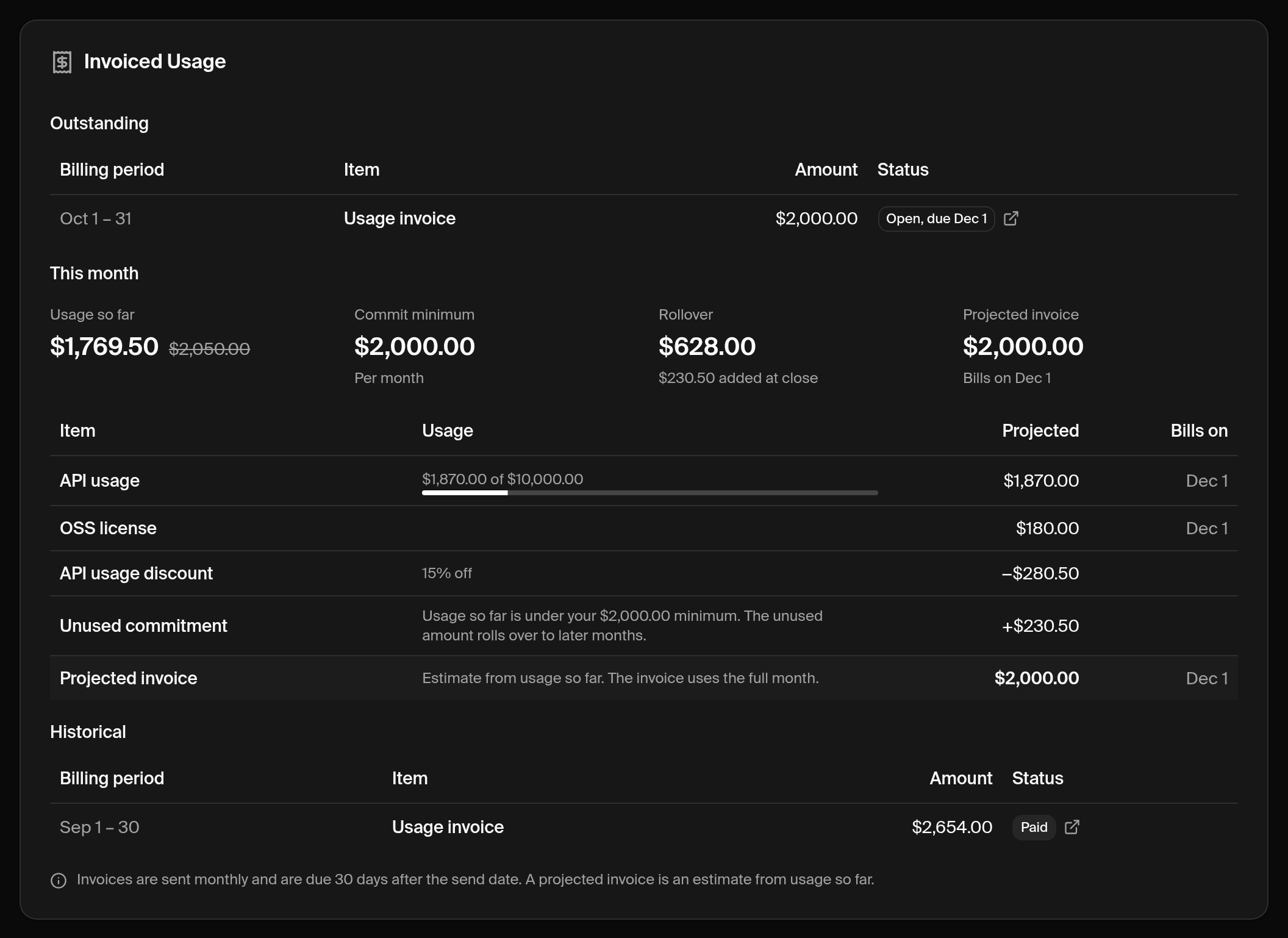 The Invoiced Usage card has these sections:
API usage under This month shows how much of the monthly API limit you’ve used. Open source usage has no limit.
Open a Monthly Statement
Select Usage invoice on any row to open that month’s statement. The statement lists each usage line with its discount. Below that, it shows any unused commitment, rollover, or prepaid balance that applied, then the invoiced total. To view and pay the invoice, select Open in Stripe or the external-link icon beside a row’s status.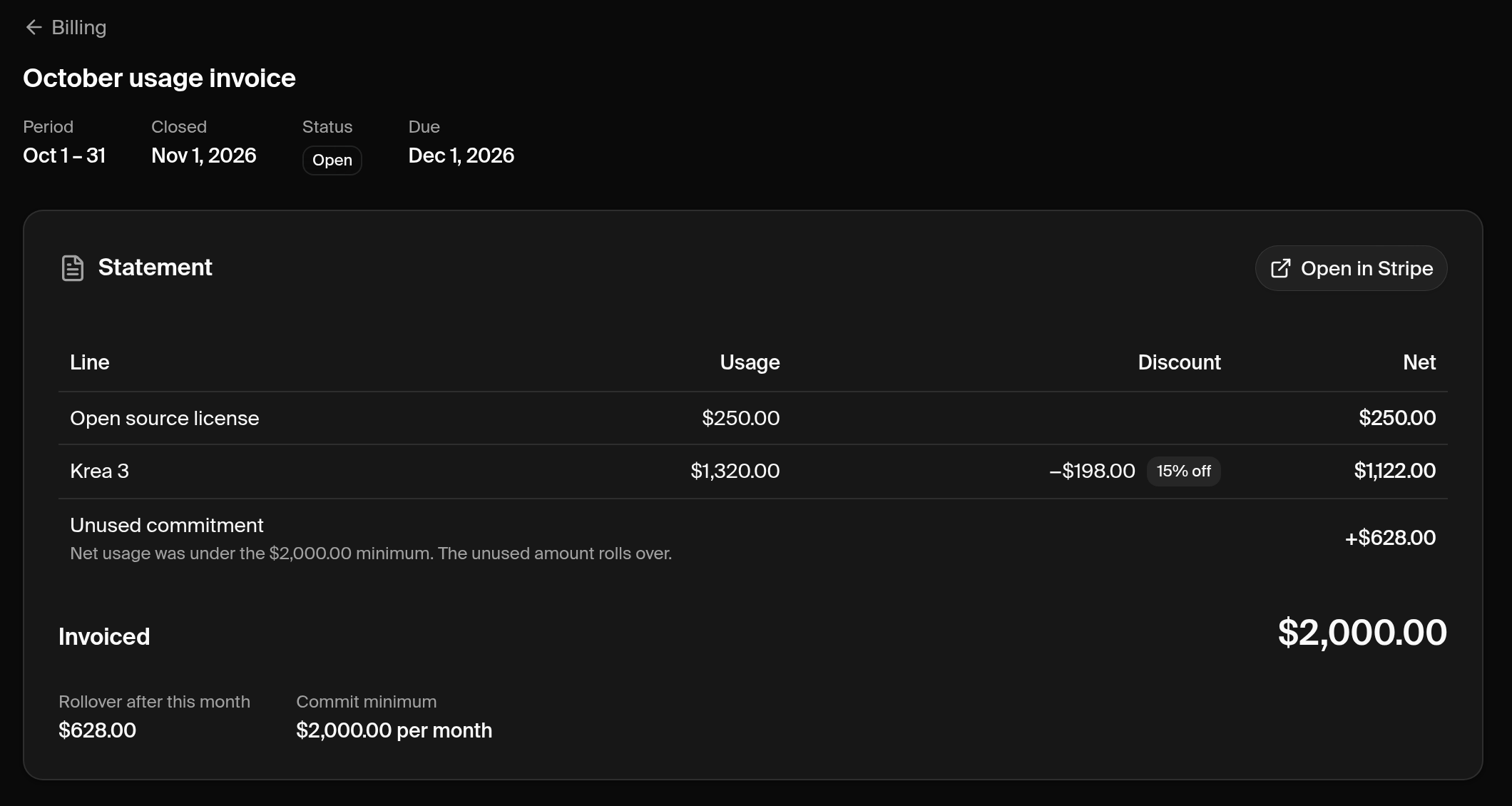 If Krea corrects a month, it voids or credits the original invoice. The new statement shows a Corrected badge and links to the earlier one, which shows Superseded.
Monthly Billing and Payment
- Each billing period is a calendar month in UTC. When the month ends, Krea closes it and invoices what accrued.
- The invoice applies your discounts, then your commit minimum, then any rollover and prepaid balance. If the balances cover everything, or less than $1.00 remains, Krea sends no invoice.
- Stripe sends the invoice to the billing email on the account’s Stripe customer. Every owner of the organization or workspace that owns the billing account also gets an email with a link to the invoice.
- Payment is due 30 days after Stripe sends the invoice. The due date appears on the invoice and in Billing.
- A new month starts at zero with the same API limit. Starting a new month doesn’t mean you’ve paid the previous invoice.
The Projected invoice is an estimate from usage so far, and Bills on
is when the month closes. Use the issued invoice for the final amount and the
due date.
API Limit
The monthly API limit caps postpaid API spending in a month. It isn’t a prepaid balance or a fixed monthly charge. Krea invoices what you use, plus any commit minimum. Once usage reaches the limit, Krea refuses new API requests until the next month starts or the limit goes up. To change your limit, contact your Krea account manager. Workspace compute budgets and member usage limits are separate controls. They do not change the limit or an invoice’s due date.Troubleshooting
I don't see any invoiced usage
I don't see any invoiced usage
Check that you are viewing the correct organization and billing account, and
that you are an Owner or Admin. No Invoiced Usage means the account has
no usage this month and no statements or invoices yet. Contact
support to confirm postpaid setup.
This month says the projection isn't ready
This month says the projection isn't ready
Krea is reviewing this month’s usage before projecting it. The invoice will
use the reviewed usage. You don’t need to do anything.
A month shows No invoice
A month shows No invoice
Krea invoiced nothing for that month. Either your prepaid or rollover
balance covered it, or less than $1.00 was due. Open the statement to see
the breakdown.
I haven't received the invoice email
I haven't received the invoice email
Ask an owner of the organization or workspace that owns the billing account
to check their inbox, and open the invoice from Billing. Contact
support to confirm the billing email or resolve a
missing invoice.